
Aggressive
Aims for the lowest market price found, as long as your margin floor still holds.
Meet Wonder at High Point Market October 15-20 · 135 S. Hamilton St., High Point, NC 27260
Book a Market MeetingFor retailers SELLING ONLINE
Keep your online prices competitive – on autopilot. Wonder dynamic pricing checks what major retail sites charge for the same popular GigaCloud products, then updates an ecommerce price that respects your margin floor.
Built for independent furniture and home retailers who sell popular GigaCloud Marketplace SKUs online.
How an Everyday price applies · Example

Online shoppers can open a new tab and find the same sofa or nightstand in seconds. Your product page price has to hold up against that.
Wonder looks up market prices for those same popular GigaCloud products. It checks Amazon, Wayfair, Target, Walmart, and Home Depot. It also checks listings surfaced through Google Merchant Center, which can include smaller retailers.
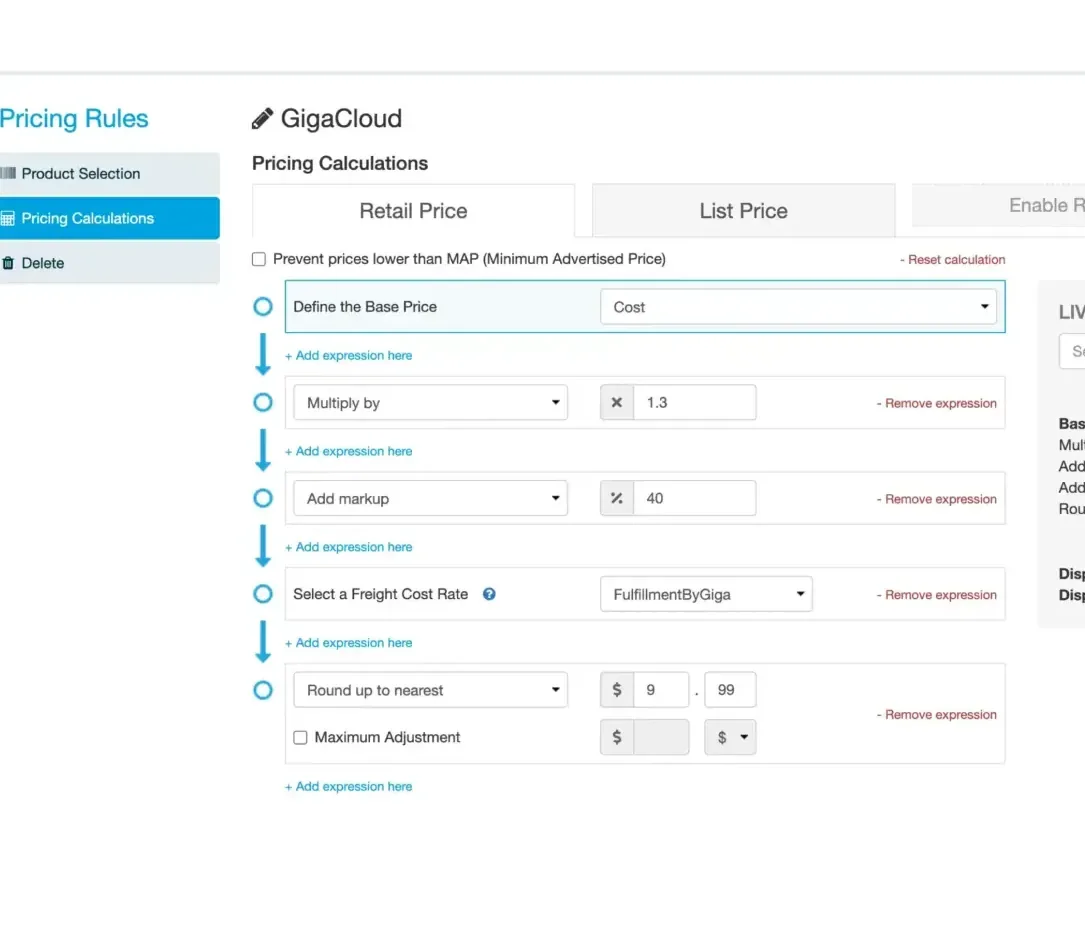
From those benchmarks, dynamic pricing applies an Everyday price in CAM for each in-scope SKU. Pick your mode and margin floor once during setup. After that, Dynamic Pricing applies prices automatically.
Your margin floor still holds the line if a market price would land too low. Prices then move out through your usual channel syncs.
See the full for retailers suite, and find more answers on our FAQ.
Ready to see market-based Everyday prices on your GigaCloud SKUs?
Set a margin floor so a low market price cannot pull your online price under the margin you need. If the floor is 25% gross margin, an item that would land at 24% or 23% stays at the floor.
That floor still stays in place after setup. Dynamic Pricing then applies prices automatically inside it.
Example
Floor
Aims for the lowest market price found, as long as your margin floor still holds.
Floor
Uses the middle of the prices found across the sites we check.
Floor
Uses the highest-found listing as guidance when you want more room above the pack. Even so, the price stays at or under the highest market listing we found.
Pick one mode during setup. You can change it later by category or SKU.
Scope
30,000
Retail-Ready GigaCloud SKUs
Dynamic Pricing is built around about 30,000 Retail-Ready SKUs on the GigaCloud B2B marketplace feed. Those are the products we can match to the same items on major retail sites and Google Merchant Center.
A custom catalog from another retailer sits outside this release. So if your online assortment is mostly those popular GigaCloud SKUs, you are in the right place.
Who it is for: Furniture and home retailers who sell those SKUs online. They want Everyday prices that move with the market, inside a margin floor they set once.
Included with the feed: For merchants on the GigaCloud feed, Dynamic Pricing on those Retail-Ready SKUs is included with that feed path.






Want a walkthrough of scope, floor, and modes for your catalog?
Dynamic Pricing lives in CAM, in Everyday regular price settings for the Giga feed. Because the price sits in CAM, it applies across connected channels: API, connector, and the CK app.
Connector sync runs about every four hours. App sync runs about once a day, or on demand. Tablet apps then pick up the update when the app opens.
If you run Shopify, your storefront can stay on Shopify. The Shopify connector keeps catalog, price, and inventory in sync. It can also carry the GigaCloud feed and order path when you are ready.
Dynamic Pricing is the market-benchmark Everyday setting for those popular GigaCloud SKUs. Use both when both are live.
Wonder subscription plans also include rule-based pricing and MAP-style controls for your own store. Those live with your plan settings.
Dynamic Pricing then adds market benchmarks and a mode on top of the margin floor. That covers the GigaCloud SKUs in scope.
Also in store: If you sell in a showroom too, the same prices can show on the Wonder kiosk and sales tablets.
Other platform options: e-commerce connectors and connectors for retailers.
Prefer to talk it through with the team first?
01
Dynamic Pricing is as easy as saying Yes. Enable Dynamic Pricing for your account with one simple click. The setup wizard will walk you through the Margin Floor and the Pricing Mode features.
02
Set up margin protection so an unreasonably deep market price cannot undercut the margin floor you need. This protects your bottom line from being eroded.
03
Lowest, Median, or Highest mode changes how the pricing automation leans. You still review before you commit and you can change this anytime. Even by category or individual SKU.
04
Spreadsheet updates are stale, the moment the upload has finished. In today’s dynamic environment, you need real-time dynamic adjustments. Time to retire the spreadsheets!
Wonder Dynamic Pricing suggests an ecommerce price for popular GigaCloud furniture SKUs using market prices for those same products on major retail sites. Retailers keep a margin floor, choose a lowest, median, or highest mode, and review each suggestion before you change a price.
Dynamic Pricing covers about 30,000 popular SKUs from the GigaCloud B2B marketplace. It compares those exact same products with prices on major retail sites such as Wayfair, Amazon, Walmart, Target, and Home Depot.
The “margin floor” keeps a suggestion from falling under the lowest margin you set. Three pricing modes allow the retailer to set an aggressive mode – which matches the lowest price out there – a “median” mode to go with a median value out of all matched SKUs, and a “high” mode to stay closely aligned with the highest-found price.
Furniture and home retailers who understand that 30% of home furnishings are sold online and would like to stop being left behind. For most independent retailers, ecommerce seems complex and comes with its own set of challenges – pricing being the biggest one. Wonder Dynamic Pricing takes the guesswork out of it and gives retailers an automated way to match market-standard prices without compromising margin.
The Shopify Connector keeps catalog, price, and inventory in constant sync with Shopify, and it can carry the GigaCloud product feed and end-to-end order path. Dynamic Pricing is a separate market-benchmark tool for those popular GigaCloud SKUs and the connector will then carry the automated pricing to the Shopify store. Use both in combination to completely automate catalog, pricing, and orders.
Rule-based pricing and MAP controls for your own store stay on your Wonder plan. Dynamic Pricing simply adds market benchmarks and a powerful automated mode on top of the margin floor for the GigaCloud SKUs in scope. MAP enforcement also stays in place – as another one of Wonder’s powerful pricing automation tools.
More answers: FAQ.
Next step
Book a short demo. We will walk through the margin floor and the three modes. We will also show which popular GigaCloud SKUs on your site are in scope.

We use cookies to improve your experience on our site. By using our site, you consent to cookies.
Manage your cookie preferences below:
Essential cookies enable basic functions and are necessary for the proper function of the website.
These cookies are needed for adding comments on this website.
Statistics cookies collect information anonymously. This information helps us understand how visitors use our website.
Anonymous analytics that help us understand how visitors use wondersuite.com.
Marketing cookies are used to follow visitors to websites. The intention is to show ads that are relevant and engaging to the individual user.
Advertising and measurement cookies used to show relevant ads and measure campaigns.
You can find more information in our Cookie Policy and .